Friday, August 10, 2018

Ch - Ch - Changes - Website Security - Facebook Business Pages

I'll be the first to admit, I don't like change. I worked for a company where we joked about the only contant was change.  So over the years I learned to go with the flow.  I get used to doing things a certain way and then things change and there's a learning curve to get up back up to speed.  This newsletter is about changes to website security and upcoming changes to Facebook Business Pages.

First let's talk about the change to website security.  From the website 'Wired' comes an article on the changes to unencrypted websites.


NEARLY TWO YEARS ago, Google made a pledge: It would name and shame websites with unencrypted connections, a strategy designed to spur web developers to embrace HTTPS encryption. On July 24th, it finally followed through.


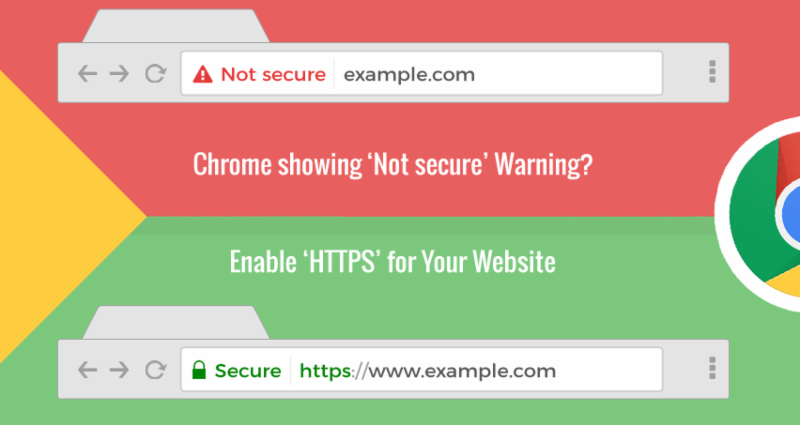
With the launch of Chrome 68, Google now will call out sites with unencrypted connections as "Not Secure" in the URL bar. The move flips the convention of how Chrome displays the security of sites on its head. 

It's a warning worth heeding. Under an unencrypted HTTP connection, any information that you send across the web can be intercepted by a hacker or other bad actor. In extreme cases, like in what are called man-in-the-middle attacks, someone could pose as a destination site-tricking you into handing over your credentials, credit card info, or other sensitive information.

It's not just about making sure that user information is private; it really ensures the integrity of the website."

For what it's worth, Chrome is not alone in posting warnings next to HTTP sites; Firefox has explored it also. Between the two, they hold 73 percent of browser market share. In addition, Google notes that the vast majority of Chrome traffic-76 percent on Android, and 85 percent on ChromeOS-already travels across an HTTPS connection. 

So how do you get your website encrypted?
  1. Step 1: Host with a dedicated IP address. In order to provide the best security, SSL certificates require your website to have its own dedicated IP address. ...
  2. Step 2: Buy a Certificate. ...
  3. Step 3: Activate the certificate. ...
  4. Step 4: Install the certificate. ...
  5. Step 5: Update your site to use HTTPS.
For the complete explanation and 'how to,' click here.

Now for the next subject, the changes to the templates for Facebook Business Pages.

If you have a Facebook Business page or are the administrator for one, you've probably already received notice that as of August 23rd your template for your business page will more than likely change, depending on what type of page you currently have.  The good news is, you don't have to wait, you can go ahead and be proactive and make the change now.

Here is a short 4 minute video that explains the change and the options:


Need help?  Give me a call and we'll figure out which one best suits your business.

I hope you have found this to be helpful. Your comments are welcomed and appreciated.

To Your Success,

Annette
'Helping You and Your Business Look Good'

Saturday, March 17, 2018

Social Media Platforms - Which Ones to Use


Why post on Social Media?  To create visibility and awareness about you, your products, and/or services.
Which platforms should I use?  It depends on your target market and demographics.  In order to know where to post, you have to know who your best clients are.  Who can use your products or services?  And don’t say anybody, everybody, anyone, everyone, because not all those folks have money to buy your products or services even if they could/should use it.  So, think in terms of age group, locale, industry, income, interests, etc.  The better you can narrow this down, the better you will know which platform to use for Social Media.
Let’s look at the major ones – Facebook, Twitter, LinkedIn, YouTube, Instagram, Pinterest, and Snapchat.
According to a recent report by http://www.pewinternet.org, Facebook is still the leader with 68% of Americans having Facebook accounts.   74% of those with Facebook accounts say they check their accounts at least once per day.  51% say they check their accounts more than twice per day.
While not a traditional social media platform, YouTube is used by 73% of U.S. adults and 98% are 18 – 24 year olds.
For younger adults 18 to 24, Instagram is viewed as the platform of choice with 71% and 45% using Twitter.  And for this age group 78% use Snapchat.
Pinterest is substantially more popular with women at 41% and men at 16%.
LinkedIn remains popular with college students and high-income households at 50%.
The bottom line is seven of 10 Americans use some form of social media.  Defining your target market for your products and services will determine where to focus your social media efforts. 
Below are two sites with a more in depth look at the numbers/reports.
Fact Sheet from 2017 on Social Media use: http://www.pewinternet.org/fact-sheet/social-media/
My questions when determining which platforms to use:  Which ones do you currently use?  You’re probably interacting with friends and like-minded people already, so it makes it easier to post and manage.  If you can link other accounts to what you already use, that’s like getting a freebie.  For instance, linking Facebook to Twitter and/or Instagram to Facebook.  I say use what you can easily post to and don’t rule any out any just because the numbers may say differently.   
And/or if you’re outsourcing your social media, cover as much and as many as your budget will allow.  Personally, my favorites are Facebook (link it to Twitter), YouTube if you like to do/can and want to do videos, Instagram if you have a visual product/service, and LinkedIn to post your professional resume. 
I hope you have found this to be helpful.  Your comments are welcomed and appreciated.
Sincerely,
Annette
‘Helping You and Your Business Look Good’

Tuesday, October 17, 2017

How do you get people to buy your products and services and refer you?


News Flash - People Don’t Want to be Sold To


Think about it….Do you watch commercials on TV?  Do you read bill boards?  Do you read your junk mail?  Probably not.  You probably don’t even listen to commercials on the radio anymore because you’re listening to your own playlist or Pandora.
Then when people need a product or service, what do they do?  Probably like the rest of us, they go back to the person who has given them good service in the past or ask their best friends or neighbors for recommendations.  Or they may even ask on Social Media.
So as a business owner trying to market your business, how do you reach your target market?  For the purpose of this article, let’s talk about social media and your business Facebook page.
·        You must have an audience - How many people ‘Like’ your Facebook business page?  Did you know that only about 5% of the people who ‘Like’ your page see what you post?  So, say you have 100 people who like your page, only about 20 are going to see what you post.  So, you must build your audience.  Suggestions to get more ‘Likes’ to your page is to ask ALL your friends, family, neighbors, etc. to ‘Like’ your page.  Send them an invitation right from your business Facebook page. 
·        You need some champions.  Other ways to get more people to see what you post, is to get ‘Likes,’ ‘Shares,’ and comments on your posts.  Facebook sees that as ‘engagement’ and then will show the posts to more people.  So, you need to ask your best buds, employees, family, etc. to be your ‘Champions.’  Ask them to Like, share, and comment on your posts.  That way, their Facebook friends see what they are Liking, Sharing, and commenting on and it builds from there. 
·        Don’t Sell to People.  People don’t want to be sold to.  Read the first to paragraphs again.  It doesn’t matter if you have the best deal in town, if no one sees the offer.  If you haven’t built any trust, then you’re wasting your time.  So, what do you post you ask.  Social Media, particularly Facebook is just that - for socializing.  Think about the last party you went to.  What did you talk about?  Current events?  Your favorite team winning or losing?  Ask questions?  ‘Did you know……blah, blah,?’  You were socializing not trying to sell your products or service.  That’s what you do on social media. 
o   Let people get to know you.  Post about you, photos, likes, dislikes, hobbies, interests, etc.
o   Use current events.  What holiday is it?  I did 8 posts last Friday the 13th for 8 different small businesses and used the theme of Friday the 13th.  Everything from haunted ships, real estate numbers, to Friday the 13th reading list.
o   Provide information.  What type of service/product do you offer?  What makes it different from others that are out there?  Provide industry information.  Seasonal information.  For example, a realtor might provide information on fire safety since last week was fire safety week.  I call this ‘Infotainment.’  Provide information and entertain your followers.  Talk from your experience and point of view, i.e. your expertise and why you care.  As the saying goes – ‘People don’t care how much you know until they know how much you care.’
o   Don’t be so serious all the time.  Laugh at yourself.  Post a cartoon.  Tell about getting lost.  You’re human.  People can relate.  Let people get to know you. 
o   Are you involved in the community?  What is your favorite charity?  Again, this is a way to help people to get to know you.
·        Post videos.  Learn to use Facebook Live.  Show before and after photos and videos.  Videos are a great way to let people know you do a good job. 
·        Get Reviews.  When people brag on your work, ask them to write a review on your Facebook page and on Google (if you are listed on Google).
·        Learn what people like.  Check out the ‘Insights’ section of your Facebook page or look at the bottom of each post.  It will show you how many people the post reached.  The posts that reached the most people – is what you need to post more of.
·        Boost your posts.  This is another way to reach a larger audience, but there are a few things to know before you throw money at this one.
o   Get very specific as to who exactly is your target market, i.e. household income, zip codes, cities, age groups, etc.  Think about who are your best clients, what is their average household income (guesstimate), where do they live, what is their approximate age, etc.  You’ll come closer to getting some additional followers if you can figure this one out and target your boost.
o   Do this intermittently and not on a regular basis.  Yes, you want to post regularly and consistently on your Facebook page, but you don’t want to be regular and consistent on boosting your posts.  Why is this, you ask?  Again, Facebook is a social platform and even though Facebook is making money on your boosted posts, they see your boosted posts as ‘selling’ and won’t show them to the larger audience you seek, if you boost to often.
These are just a few tips for using Social Media to market your business.  You can search my blog site for more articles about Social Media.  If you’re still feeling overwhelmed and don’t know where to start, contact us.  We can teach you how or do it for you.
Your comments and feedback are welcomed and appreciated.
Happy Posting,
Annette

Wednesday, August 9, 2017

How to Build Your Social Media Following

Oftentimes when I meet with clients and review their Social Media sites I discover they don’t have very many followers. In order to get your message out to your target market, you have to build a following. So how do you do that given the constraints and algorithms of social media, particularly Facebook and Facebook business pages.

First, we must understand why people are on Facebook. Why are you on Facebook? To connect with your friends, to be entertained, look for recommendations, sell stuff, get information? It’s different for everyone. So, if you have a business fan page, you need people to ‘Like’ your page, so that when you post on your business page, some percentage of those who ‘Like' your page will see your posts. And you also have to realize that not everyone who ‘Likes’ your page will see your posts. With that in mind, is it worth your time?  The answer is yes, if you’re willing to do the work to get a following.

Here’s some recommendations to help to build your following:
-        First make sure you have a complete
Facebook business page. Complete your about section and describe your business. There is a place for a short description and a place for a long description. Hours of operation. Complete all the sections.
-        Brand your business. Invest in a logo and corporate colors. Ensure your branding is consistent across all social media sites. When someone goes looking for you on their favorite social media site, you want to be easily recognizable.
-        Have a custom professional banner. If you want people to call you, make sure your phone # is in the banner. If you’re a plumber, no one wants to scroll down the page to find your phone # if their toilet is running over.
-        Set up a custom URL, i.e. www.facebook.com/nameofyourbusiness - not something that ends in a bunch of #s and funny characters.
-        Make sure your Facebook page is verified.
-        Start with your family, friends, employees, clients, and prospects. Invite them all to like and share your page.
-        Send an email or snail mail to all your clients and prospects and ask them to 'Like' your page.
-        If you have a brick and mortar place of business, post a sign in the window, at the counter, and print it on the client’s receipt - Like us on Facebook - Follow us on Twitter.
-        Make sure all your marketing material, website, business card, email signature line, etc. has your social media links on them.
-        As you start posting content on your page, ask your closest family, friends, and employees (if you have them) to ‘Like,’ Share, and Comment. The more ‘Likes’, Shares, and comments you get, the more Facebook with show your posts to others. It’s called engagement. The more interesting and engaging your material is, the more Facebook will show it.
-        Post images. Original interesting images. Original engaging content. Yes, you can find material on the internet to share, but Facebook likes originality best.
-        Videos are great. Again, original material. No more than 3 to 5 minutes. Also, go back and edit and caption your videos. Sometimes people are in places where they do not want to turn up the sound on videos, so if it isn’t captioned, they won’t watch.
-       For your content, don’t just post about your business, but post about yourself, your community involvement, a day in the life of, your story, your passion, demonstrations, before and after, etc. Think in terms of reality shows. Your Facebook Business page is your business reality show. People want to know about you, so don’t make it all about your business. Think ‘Infotainment.’
-        Feature some of you clients on your page.  Tag people in your posts.  People love recognition.
-        Post about current events, holidays - especially the ones that have something to do with your business. If you’re into healthy eating, Aug. 8th was ‘NATIONAL SNEAK SOME ZUCCHINI INTO YOUR NEIGHBOR’S PORCH DAY.’
-        Hashtag your posts, i.e. #hashtagyourposts #socialmedia
#morelikesandshares. Why? This makes your content searchable especially if it relates to some current event or trend.
-        Be consistent in your posting. A Facebook business page is not like a website. If there are no consistent posts, then Facebook, after a period of time, has the right to shut down the page. So be active. At least post a couple of times a week. You can schedule posts to a Facebook business page.
-        Link pages together when possible, i.e. link your Facebook business page to a Twitter business page, so that when you post on one site, it will appear on the other.
-        On LinkedIn you can post links to all your social media sites. 
-        Set up a YouTube channel. Link your Facebook page to your YouTube channel.
-        If you have a visual product like a florist, set up an Instagram account and a Pinterest Account.
-        Use an application like Hootsuite to manage your social media and to only have to post in one place. 
-        Study your ‘Insights,’ and your stats. See what gets more ‘Likes’, comments, and shares? Post more material like that. For instance, I have a travel agent that I post for, but when she posts about some of her personal travels, those posts get more ‘Likes,’ shares, and comments.
-        Follow those in the same industry as you to see what they do. Don’t copy them, but use it to learn better what to post for you.
-        Be social as your page - ‘Like,’ comment, and share other’s pages posts especially if it’s in the same general field as yours. This helps with your following because it’s not always about you. You have to give to get.  Hopefully they will return the favor. 
-        Join groups that relate to your business, local sites, Women In Business’ allows you to post links to your Facebook page, website, post specials, etc.
-        From time to time, boost a post. Spend $20 bucks from time to time (not all the time) and boost a post in order to gain a larger following.
-       Get Reviews.  Those clients that praise and rave about your product or service, ask them to write a review on your Facebook business page.  Be sure and thank them when they do.  The more positive reviews you have the more creditable you will appear to your followers.

What else have you found that helps to build your following? Your comments and feedback are welcomed and appreciated.
Here are some other articles I have written in the past. They have some of the same information, but also have additional tips not mentioned in this article.

- 'Social Media - It's about being social'
- 'How are you building your following on Social Media'
- 'Tips for Growing Your Business with Social Media'
Building a following is not rocket science, it just takes time, work, and a little creativity.

If you need a little help, let us know, that is what we do.  
We appreciate your comments and feedback.  Send us an email, or you can provide feedback on our Facebook page as well as our blog.
 
Oh and BTW - We would appreciate it if you would 'Like' our  Facebook page.

Happy Posting,
Annette
'Helping You and Your Business Look Good'

Tuesday, March 7, 2017

Tips for Growing Your Business with Social Media


Do you feel like a lab rat at times, posting, posting, but never getting anywhere when it comes to your Social Media marketing for your business? 
First and foremost, you must understand why people are on Social Media, i.e. to keep up with their friends and family, post their activities, to be social, and to be entertained, etc.  It’s more than likely not to search for your business.  Therefore, if you are constantly posting ‘buy, buy, from me’ type posts, they are not showing up in anyone’s news feed.  So, what and how should you post?

Here is a list of tips for getting more exposure on Social Media.
  1. Set up Social Media accounts in your business name.  Keep your personal accounts separate from your business accounts.  Set up as many social media accounts as you can maintain, because not everyone uses/likes the same media, i.e. Facebook, Twitter, Google+, YouTube, LinkedIn, Instagram (especially if you have a visual product).
  2. Make or have made a professional custom banner for your social media sites.  If you are a local business and you want people to call you, put your phone number in your banner.  Have your branding, i.e. logo, colors, etc. consistent across all social media sites.
  3.  On your Facebook Business Page, list your business as the name of your Facebook Business page.  For example:  If you are a Real Estate agent and work for ReMax Properties, put your Business Facebook page as Jane Doe Realtor, then on your personal page list your business as ‘Jane Doe Realtor’ that way it will link to your business page.  You can list in your ‘About’ section that you are with ReMax Properties.
  4.  Link your social media accounts where possible.  For example, link Facebook and Twitter business pages, so that when you post on Facebook/Twitter, it will automatically show up on the other page.  This way you get double the exposure with only one post.
  5.  If you are just starting out, ask your friends and relatives to ‘Like’ and share your page.  In
    fact, if you can get your close friends to continue to ‘Like,’ comment, and share your posts, that will get your posts more exposure.  Thank people and tag the ones who ‘Like’ your page.  And when they comment, ‘Like’ their comments and comment back if appropriate.  Social Media is supposed to be interactive.
  6.  Educate your audience.  Not necessarily about what you do, but more about the industry you represent.  Tips and ideas.  For example, if you are a travel agent, post travel tips, how to pack, where to get a passport, etc.
  7.   Use Hashtags that are relevant to your post, i.e. #socialmediatips #growyourbusinesswithsocialmedia #usehashtags.  These hashtags are searchable.
  8.  Post information about yourself.  How did you get started in your business/industry/profession?  About how you stay up on your industry, i.e. classes you take, books you read, networking/association meetings you attend, etc.
  9.  Post about your clients, especially those that praise your work.  Thank and tag them publicly on your social media channels.  Publish their testimonials.
  10. Post as much original content and media as possible.  The more original the more exposure it will get.  Posts with photos get more views than those without.  If you do your own photos, put your logo or website on them before posting.

  11. Do videos.  Do Facebook live.  People want to see and hear you.  Get to know you, the person you want them to do business with.
  12. Entertain – Quotes, Cartoons, humorous videos, etc. go a long way.  People are more apt to   These don’t necessarily have to do with your business.  For some reason, every time I post something on my business page about coffee, it gets more views than anything else.
    share and retweet.
  13. Post about relevant news, current events, things happening in the community, holidays, etc.  I advise staying away from politics, religion, and other controversial topics on your business pages.  
  14.  Post about holidays.  Find a holiday calendar, like https://www.brownielocks.com/b3bcalendar.html and see what holidays you find interesting and use them for posting.  Or if you like the more bizarre, try http://www.gone-ta-pott.com for the weird holidays you never knew existed like Buzzard Day or Ear Muffs Day.  Yes, Virginia, these are actual holidays.
  15.  Share other people’s posts on your page.  Liking, Commenting, and Sharing is caring.  People will be more apt to Like, Comment, and Share your stuff if you Like, Comment, and Share their posts.

  16. Join local business groups.  For example, on Facebook there are usually many local business groups.  Join them.  It makes it easier for people to refer you because they can tag you when they list your name when someone asks for a referral for your industry/profession.
  17. Boost your posts from time to time to get to a larger audience, but don’t do it all the time because it will lose its effectiveness.

  18. Post a survey.  Ask questions.  Start a conversation.  The more engaging a post is (i.e. the more Likes and comments it gets) the more people will see it.
  19. Be persistent and consistent.  On a Facebook Business page, you can do posts and schedule them for a future time and date.  If people are looking for you or your business you want to make sure you are consistently posting, whether that’s once a day or once a week.  I’m sure if you go to a Facebook business page and there hasn’t been a post in 6 months, you wonder if they are even still in business.
  20.  If you can’t do this all yourself or don’t have the time, delegate it to someone else in your company or hire someone to do it for you.
      We hope you have found this information helpful.  Your feedback and comments are welcomed
and appreciated.  If you have other things that have worked for you, we would love to hear them.

Oh and BTW - We would appreciate it if you would 'Like' out Facebook page.

Happy posting,
Annette
‘Helping My Clients and Their Business Look Good’


blogger templates 3 columns | Make Money Online